





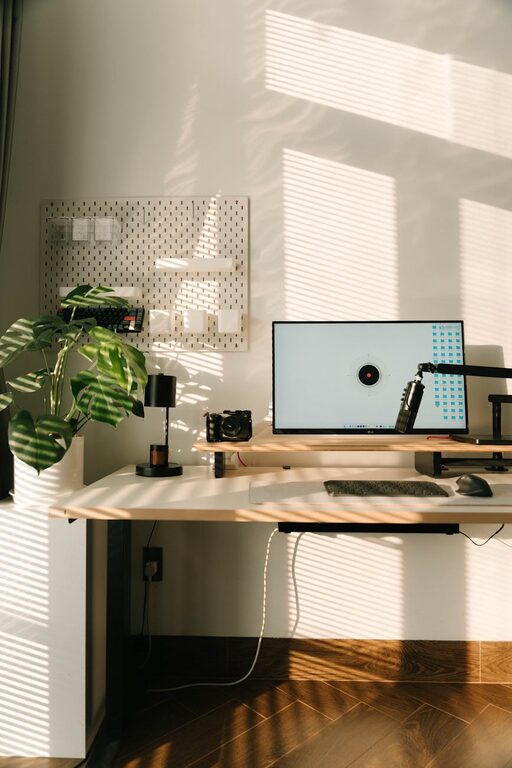
Creating a productive home office space is essential for anyone working remotely or managing tasks from home. A well-designed workspace can improve focus, reduce distractions, and increase overall work satisfaction. Whether you’re setting up a new office or improving an existing space, these tips will help you create an environment that supports your best work.
Choose the Right Location
The first step in creating a productive home office is choosing the best spot in your home. Ideally, this should be a quiet area with minimal foot traffic and noise. Here are a few things to consider:
– Natural light: Position your desk near a window to take advantage of natural light, which can boost mood and energy.
– Privacy: Select a space that allows you to close a door or create boundaries to reduce interruptions.
– Space: Make sure the area has enough room for your desk, chair, and any necessary equipment.
If space is limited, consider using room dividers or noise-cancelling headphones to create a sense of separation between your work and home life.
Invest in Comfortable Furniture
Comfort is key to staying productive during long work hours. Ergonomics play an important role in reducing strain and improving posture.
Desk and Chair
– Desk: Choose a desk that suits your work style, whether it’s a traditional desk, standing desk, or adjustable model.
– Chair: Invest in an ergonomic chair with good lumbar support and adjustable height settings.
Accessories for Comfort
– Consider using an external keyboard and mouse to improve ergonomics.
– A footrest can help maintain proper posture.
– Position your monitor at eye level to avoid neck strain.
Optimize Lighting
Lighting affects how well you can focus and reduces eye strain.
– Combine natural and artificial light sources.
– Use a desk lamp with adjustable brightness to control lighting according to your needs.
– Avoid glare on screens by positioning monitors perpendicular to windows.
Organize Efficiently
A cluttered workspace can be distracting and reduce efficiency.
– Use storage solutions like shelves, filing cabinets, or desk organizers to keep supplies and documents tidy.
– Implement a filing system for important papers to avoid piles of clutter.
– Keep only daily essentials on your desk to maintain a clean work surface.
Digital organization is also important — use apps or programs to organize tasks, emails, and files so everything is easy to find.
Minimize Distractions
Distractions can derail your workflow, so consider ways to minimize them:
– Turn off non-work-related notifications on your devices.
– Use noise-cancelling headphones or play background music or white noise if it helps you focus.
– Set boundaries with family members or roommates about your work hours.
Personalize Your Space
A workspace that reflects your personality can boost motivation.
– Add some plants to improve air quality and create a calming atmosphere.
– Incorporate artwork or photos that inspire you.
– Choose colors and décor that make you feel comfortable and energized.
Just be careful not to over-clutter or add distractions.
Set a Routine and Take Breaks
While this tip isn’t about the physical space itself, it complements an effective office setup.
– Designate specific hours for working and breaks.
– Use a timer or app to remind yourself to stretch and move regularly.
– Keep your workspace focused on work-related activities only.
Manage Technology and Connectivity
Reliable technology is crucial in a home office:
– Ensure you have a strong internet connection.
– Keep cables organized with clips or cable management boxes.
– Invest in necessary equipment like printers, second monitors, or webcams depending on your job.
Maintain Your Workspace
Finally, keep your office space clean and organized by dedicating a few minutes each day to tidy up and refresh your environment.
—
By setting up a home office that prioritizes comfort, lighting, organization, and minimal distractions, you’ll create a productive environment that can help you stay motivated and focused. Remember, a great workspace is one that adapts to your needs and habits, so don’t hesitate to make adjustments over time.